FILL OUT THE CONTACT FORM FOR A FREE 15-MINUTE CONSULTATION


AI Guidelines in European Schools: 5 Essential Rules for Every Teacher
Explore the official Schola Europaea guidelines for generative AI in education. From data privacy to human oversight, learn the 5 golden rules every teacher needs to know
Özge Zeytin Bildirici
4/23/20266 min read

Dear Colleague! Welcome to the team.
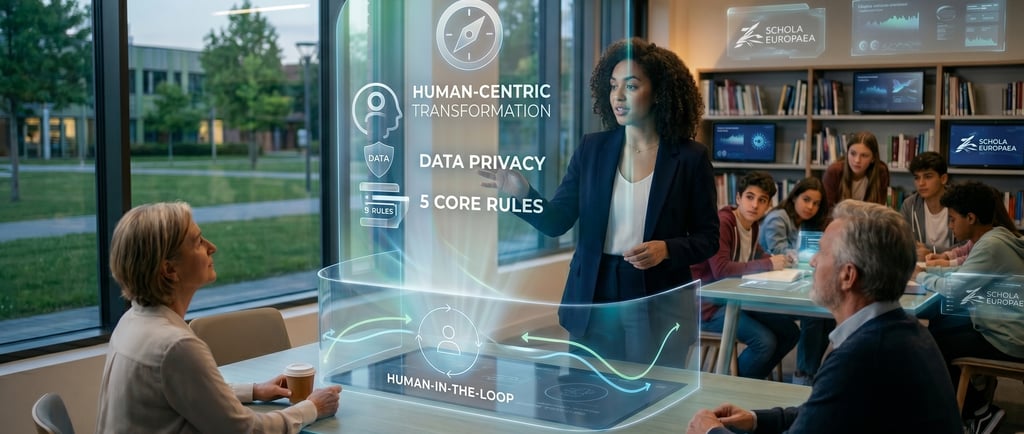
You’ve probably heard a lot during your university years about how AI will change education, but now that you’re in the field, things are getting a bit more serious. As of May 1st, 2025, the European Schools (Schola Europaea) have introduced very clear rules regarding the use of AI. This guide is essentially a roadmap that will prevent classroom headaches, protect you legally, and ensure a transparent relationship with your students. Let’s talk about these 5 core rules and how they will reflect in your lessons, just like we’re having a coffee in the staffroom.
3. Data Security and Privacy: The Most Critical Point
This is where you need to be most careful. As a new graduate, you're likely tech-savvy, but the school has very strict rules regarding "data privacy."
You cannot upload student names, grades, photos, or confidential school documents to any public AI tool.
Think of it this way: The moment you type a student's strengths and weaknesses into a chatbot to "create a study plan," you are gifting that child's private development data to that company's dataset. This is both a violation of GDPR and unethical. Furthermore, explicit parental consent is mandatory for any use involving students under 18. If you are going to use AI actively in a lesson, you must ensure you have the approval of both the school administration and the parents. Protecting a child's digital identity is a higher priority than teaching them information.
4. Human Oversight (You Must Check Everything)
AI sometimes lies with great confidence; we call this "hallucination." Our fourth rule is very clear:
No content generated by AI is a final product; it must be checked by a human (you or your student).
If you ask AI to prepare an exam and a piece of information in that exam is wrong, you cannot say in class, "But the AI wrote it this way." The responsibility is always yours. The same applies to the student. If a student takes a resource from AI, they are obligated to verify the accuracy of that resource. We call this "Human-in-the-loop." Technology only prepares a draft; what turns that draft into knowledge and truth is your teaching experience. You should also instill this in your students: "The machine can be wrong; your job is to be knowledgeable enough to catch its mistake."
5. Transparency: We Have Nothing to Hide
Academic integrity is our greatest treasure in education. Our fifth rule turns AI use from a secret "cheat" into a transparent process:
If AI was used in a material or an assignment, it must be clearly stated.
Let's say you prepared a great presentation and had AI generate the visuals. You need to write "AI-assisted" in a corner of the presentation. Similarly, students must honestly state which parts of their homework they got ideas for from AI and which parts they wrote themselves. This is vital for establishing a culture of honesty in the classroom. A student who says, "I used AI because it saved me time in researching these topics," is far more valuable than a student who secretly has AI do their homework.
Invisible Cost: Digital Sustainability
We’ve talked about rules and legal boundaries, but at the end of the guide, there is a warning that is perhaps the least noticed but the most vital for our world: the environmental cost of AI. As a teacher, you need to tell your students not just how to use technology, but also about the footprint this technology leaves on nature.
As you know, when we ask AI to generate text or a visual, massive servers work in the background. These servers consume incredible amounts of electricity and require tons of water for cooling. The guide warns us very clearly on this: "Avoid unnecessary, compute-intensive tasks like generating videos or images just for fun."
You can present this to your students as an awareness project. Asking them this question can spark a great discussion: "I wonder how many liters of water or how much carbon emission this answer you got in seconds cost?" This approach turns the guide from a mere list of prohibitions into a lesson where you instill "digital ethics" and "environmental responsibility." Remember, digitalization is not just about efficiency; it’s also about managing the cost of that efficiency to the planet.
Section 7: Scenarios and Advice for Practice
As you can see, my dear colleague, these rules and environmental awareness points actually create a protective shield around you; they aim to keep you away from legal liabilities and ethical dilemmas. However, even if everything looks very clear in theory, things will get a bit more colorful when you enter the classroom. You might be thinking, "Well, how do I make my lesson more exciting without breaking these rules?" or "How should I react to an unexpected AI move from my student?"
This is exactly where it’s useful to look at some practical application scenarios and advice from the field to help you bring the principles of the guide into the classroom:
Student: "Teacher, what's the difference between searching on Google and asking ChatGPT?" You can tell them: "Google finds the information that exists; AI uses that information to produce something new. However, AI sometimes just puts words together and can make up the meaning. You can see the source on Google, but you need to question the source on AI."
Fellow Teacher: "Should we check every assignment with AI detection tools?" The school guide is very clear on this: AI detection software is not 100% reliable. You cannot accuse a student based solely on these tools. Instead, getting to know the student's writing style or asking them to explain the topic orally in class is the safest way. In other words, you should evaluate with your teaching intuition, not just with technology.
1. We Are Users, Not Developers
As a new teacher, you might be very excited; perhaps you know how to code and think, "I'll write an AI tool to measure my students' performance." This is where the first rule says stop:
Staff are strictly forbidden from developing their own AI models.
The reason isn't technical incompetence; it’s entirely legal. There is a reality called the EU AI Act. If we, as a school, attempt to produce our own AI, we become legally equivalent to a technology company. This places a massive audit and liability risk on the school. Our job isn't to produce software; it’s to integrate existing, secure tools with pedagogy. You can use ChatGPT, Gemini, or other approved tools for your lessons, but never try to build your own chatbot using school data. Save your energy for how to make your lessons more efficient with these tools, not for writing code.
2. We Manage Student Use
We used to say "put your phones in the box," but now we’re talking about how to manage AI. Our second rule is this:
AI tools are not a free research area for students; they are educational materials under your control.
Students tend to see these tools as "homework-doing robots." Your job here is to break that perception. For example, a student cannot simply have AI write their entire essay and hand it in. The guidelines state that a student can only use these tools in line with the pedagogical goals set by the teacher (that’s you). If you say in class, "Children, let's ask AI about this topic using this specific prompt and analyze the answer together," that’s great education. But if you say, "Go home and do this homework with AI," you’d be stepping outside the rules. The goal is to teach children not just how to get results, but how to direct AI and filter the information coming from it.
Conclusion: Don't Be Afraid, But Be Cautious
In conclusion, AI will neither take away your job nor make your students completely lazy. If you make these 5 rules the fundamental rules of your classroom, you can use technology not as an "escape route" but as a "learning assistant." Our goal is not just to give children information; it’s to teach them how to find that information, how to verify it, and how to use it ethically.
The future is now in our classrooms, and you will always be the one managing this future. AI can be your right hand on this path, but the brain and the conscience must always remain with you. I wish you great success!
Frequently Asked Questions (FAQ)
1. What should I do if a student confesses to using AI in their homework? If they say this honestly and have added their own interpretations to the homework, this is a success. Congratulate them on their honesty and ask them to explain to the class how they completed the parts the AI left missing.
2. What if parents complain that "AI is making children's brains lazy"? Tell them about this guide. Explain that the school has not let AI run wild, but rather uses it as a tool for "critical thinking." Knowing how sensitive we are about data security will also put them at ease.
3. Can I use free tools (like ChatGPT) in the classroom? You can, but without entering data. It's ideal for asking general questions or creating sample texts. However, entering student data is strictly forbidden.
4. What happens if AI gives wrong information? This is a great "teaching moment"! Project that wrong information onto the board and discuss with your students why it's wrong and what the truth is. Wrong information is the best way to test if a student truly understands the topic.